Enable SMS for users and assign them to an SMS campaign
Customer admins can enable SMS and assign an SMS Campaign to their users using a new or existing phone number on 8x8 Work, only after the SMS campaign has been approved. They can also disable SMS for some users and remove them from the campaign.
Note: SMS campaign is available only for the US and Canada.
Requirements and limitations
Before assigning users to an SMS campaign:
- Your SMS campaign must be approved and verified (Brand Registration and Campaign Registration).
- Campaigns are available only in the US and Canada.
- By default, each SMS campaign allows up to 48 phone numbers. To request more than the default number of allowed phone numbers, you can contact 8x8 support once your campaign has been approved.
Important!
- Only one phone number per user can be enabled for SMS.
- Enabling a different number will disable the previously enabled number automatically.
- The Deactivate campaign button permanently disables SMS for all phone numbers in the campaign. This action cannot be reversed.
 Enable SMS for a user via User Profile
You can assign users to an SMS campaign only after SMS Campaign Registration is complete and verified. Before assigning users, you must enable SMS for new users or phone numbers not already on the SMS page, or for those that have been removed.
To enable SMS for a user via the User Profile page:
- Go to Home > Users.
- Click Edit
 in the desired user row.
 - Go to SMS-enabled numbers.
- Toggle SMS Disabled on for the desired phone number(s).
- Click Save.
The status changes to Pending while provisioning occurs. The SMS Campaign ID is assigned automatically. Provisioning may take up to 48 hours. Status will update to:
- Enabled (success)
- Enabling Failed (error)
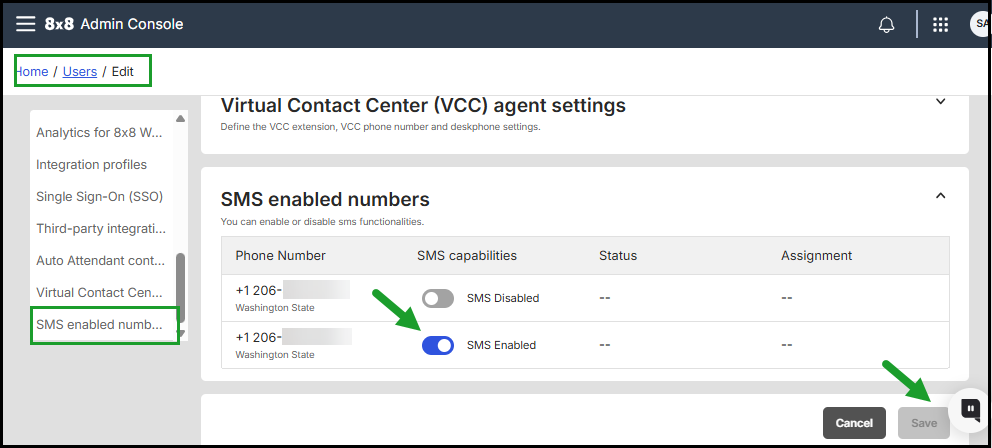
Disable SMS for a user via User Profile
- Go to Home > Users.
- Click Edit in the desired user row.
- Go to Your SMS-enabled numbers.
-
Toggle SMS Enabled off for the desired phone number(s) to remove them from the campaign.
- Click Save.
The Status now shows as Pending. Status will display:
- Disabled (or blank)
- Disabling Failed
Enable mobile numbers for SMS campaigns from the SMS page
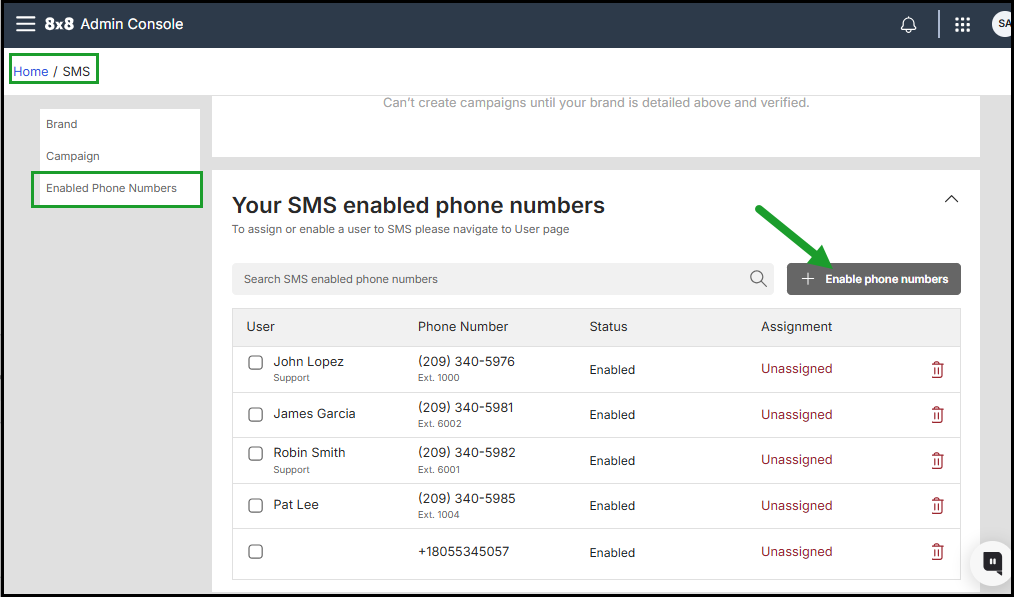
You can enable one or more numbers from Your SMS-enabled phone numbers list .for the SMS campaign.
- Navigate to Home > SMS.
- Go to Your SMS-enabled phone numbers.
- Click + Enable phone numbers.
- Enter the phone numbers in full international (for example, +15551234567).
- Click Enable.
Notes:
- Only one SMS-enabled number per user can be active at a time.
- The first enabled number becomes the default SMS number.
Assign enabled-users or numbers to an SMS campaign, individually or in bulk
Once users are enabled for SMS but not yet assigned to a verified SMS campaign, you can assign phone numbers to an SMS campaign. Users appear as Enabled but Unassigned in the Your SMS enabled phone numbers list.
Note: If you do not see the desired users in the Your SMS enabled phone numbers list, you need to enable the SMS campaign feature for them. Once you do this, their numbers will appear in the list.
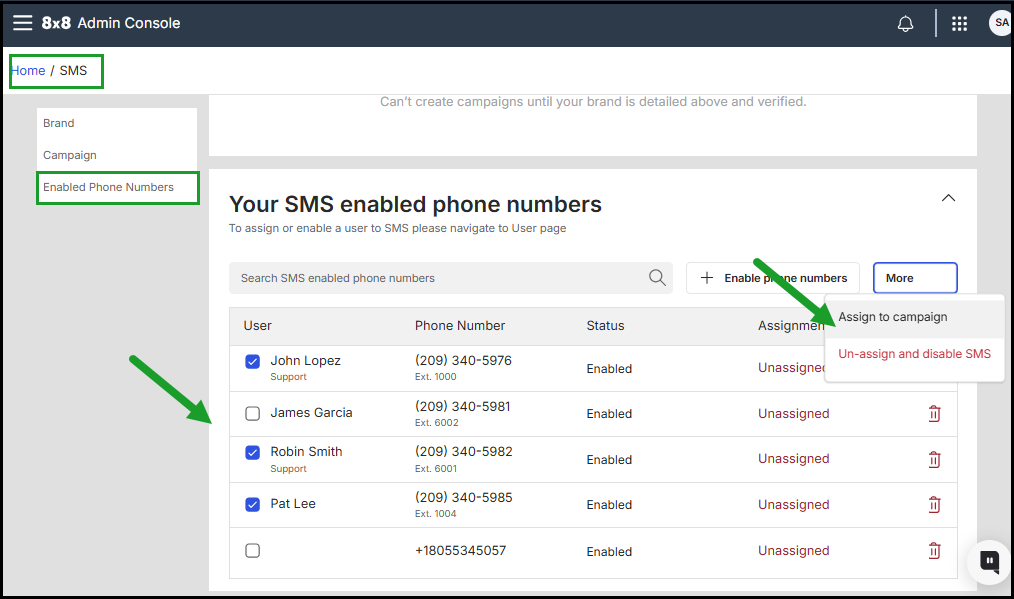
To assign enabled-users to an SMS campaign, individually or in bulk:
- Go to Home > SMS.
- Under Your SMS-enabled phone numbers, click the check box next to each user(s) you want to assign to the campaign.
- Click More > Assign to campaign.
- The status changes to Pending until processed for each selected user.
- Refresh the page. Assigned users display as Enabled and Assigned.
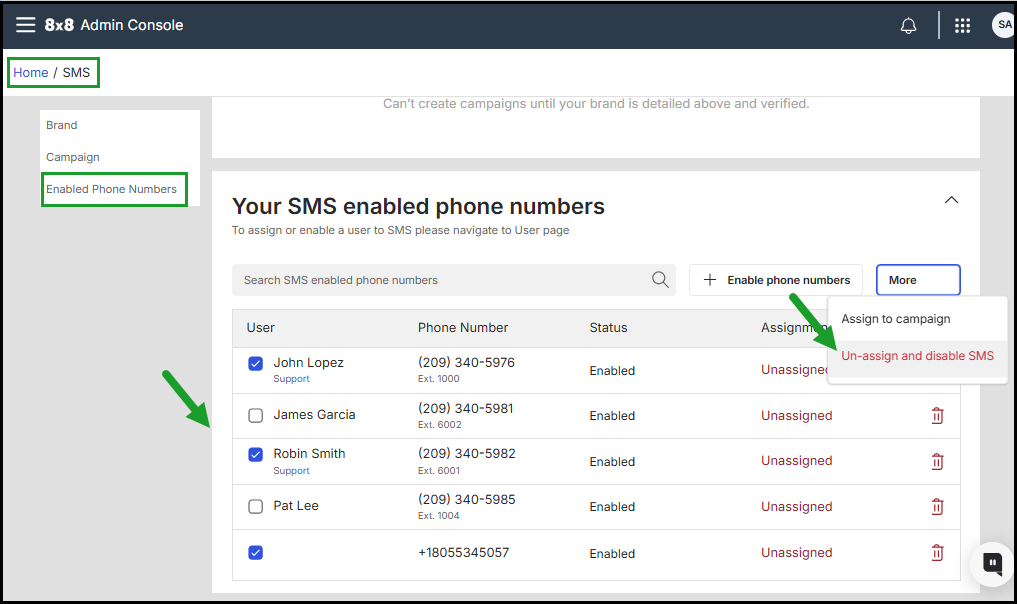
 Unassign Users from an SMS Campaign
- Go to Home > SMS.
- Under Your SMS-enabled phone numbers, check the box next to each desired user.
- Click More > Unassign and disable SMS. Action is immediate; no confirmation prompt.
- Status shows Pending until processed.
- Refresh the page. Users no longer appear in the enabled list.
-
Once the changes have been saved and processed by the carrier:
- The phone numbers will be removed from the Your SMS enabled phone numbers list.
- The affected phone numbers will show as Disabled or blank in each user's profile.