SMS registration: Brand and campaign registration
Customers with United States or Canadian phone numbers are required to register a brand and create a campaign to enable SMS. No registration is necessary to enable SMS in other supported regions.
When configuring an SMS campaign, first you need to register your brand. After your brad has been validated you can define your activities and their purpose.
 Step 1. Brand registration
The Your Brand section requires you to define who you are as a business. This section must be completed and marked Verified before accessing the next section, Your Campaign.
To define your brand:
- Log in to 8x8 Admin Console.
- Navigate to Home > SMS.
- Complete the Your Brand form. For details, see Required Brand basic information.
- Click Save. The app calls the Campaign Registry, which registers the campaign in about a minute.
- Once the brand is confirmed as verified, move to the campaign creation step.
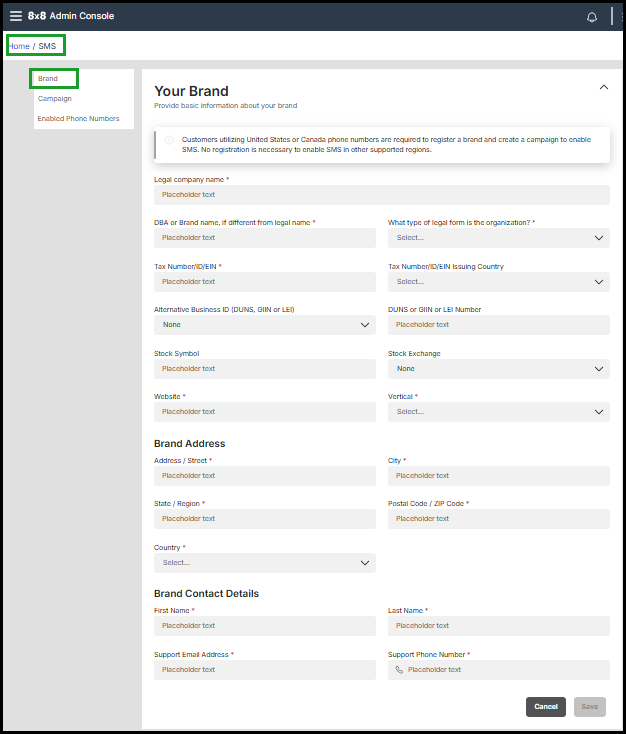
Required brand basic information
| Brand basic information | Description |
|---|---|
| Legal company name |
Legal Company Name: Must match IRS documentation Include the complete listed name to avoid delays in verification. |
| DBA or Brand name, if different from legal name |
Public-facing name; use legal name if no Doing Business As (DBA). |
| What type of legal form is the organization? |
The type of organization that is associated with your brand. Choose from
Note: If you select: |
| Tax Number/ID/EIN |
Tax Number ID or Employer Identification Number (EIN). EIN is a 9 digit number assigned to a business by the IRS. For UK customers, this is the UTR. |
| Tax Number/ID/EIN/UTR Issuing Country | The country where the Tax ID, EIN, or UTR was issued. |
| Alternative Business ID (DUNS, GINN, or LEI) | Optional: If your business has an alternative business identification number, such as a DUNS, GINN, or LEI, you can use this optional field to input that information. This can help further validate your business |
| DUNS, GINN, or LEI Number | Optional: ID form used to identify a international business entity |
| Stock Symbol | It is required only if your company is publicly traded and you select Public Company as the legal form. |
| Stock Exchange | It is required only if your company is publicly traded and you select Public Company as the legal form. |
| Website | A valid web or social presence |
| Vertical | Select the closest industry from provided options. |
| Brand Address | Registered business address. |
| State | Required for regional identification if you choose the United States as your business country. |
| Country | Required for regional identification if you choose the United States as your business country. |
| Brand Contact Details | For carrier communication if needed. |
Step 2. Campaign registration
The Your Campaign section requires a description of your activities and their purpose. This section must be completed and marked Verified before you can enable SMS for your users and assign them to the campaign.
To define your campaign:
- Navigate to Home > SMS.
- Complete the Your Campaign form. For details see Required Campaign information.
- Select the Registration Fee checkbox to acknowledge.
- Click Save to finish.
-
Once your campaign has been completed verified, enable SMS for your users and assign them to the campaign.
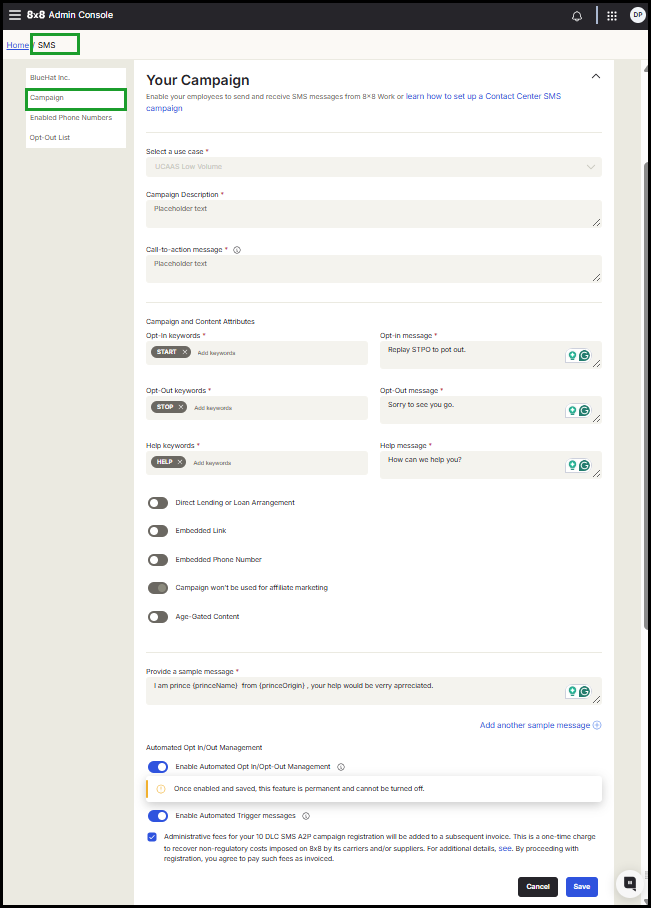
Required campaign information
| Campaign filed | Description |
|---|---|
| Select a use case | Defaults to UCaaS Low Volume.8x8 Work SMS functions as a business phone number, allowing for conversational-level SMS communications. |
| Campaign Description | Minimum 40 characters and maximum 4096 characters |
| Call-to-action message |
How consumers will opt in to receive messages. Examples of how to do this:
|
| Campaign and Content Attributes |
How customers will choose to join, leave the campaign, or request assistance. Include automated responses that confirm user intent and provide support details.
|
| Direct Lending or Loan Arrangement | Specify if this campaign covers direct lending or other loan agreements. |
| Embedded Link |
Declare any embedded links. Public link shorteners (such as tinyurl or bitly) are not permitted. |
| Embedded Phone Number | Declare the embedded phone number different from what is specified in the HELP message. |
| Campaign won't be used for affiliate marketing |
Customers must agree not to use business SMS for affiliate marketing, as required by CTIA messaging rules. Enabled and cannot be disabled. |
| Age-Gated Content | Declare if applicable. |
| Provide a sample messages | Provide a sample(s) of a typical SMS message. A minimum of 20 characters is required. You can add other |
| Enable Automated Opt-in/Opt-Out Management |
Automatically blocks outbound messages to numbers that have opted out via SMS or been added to the opt-in list in the 8x8 Admin Console. Important! Once enabled and saved, this feature is permanent and cannot be turned off. |
| Enabled Automated Trigger messages | Requires Opt-In/Opt-Out Management. Automatically sends preconfigured responses when contacts reply with Opt In, Opt Out, or Help keywords. |


